Table of Contents
TL;DR
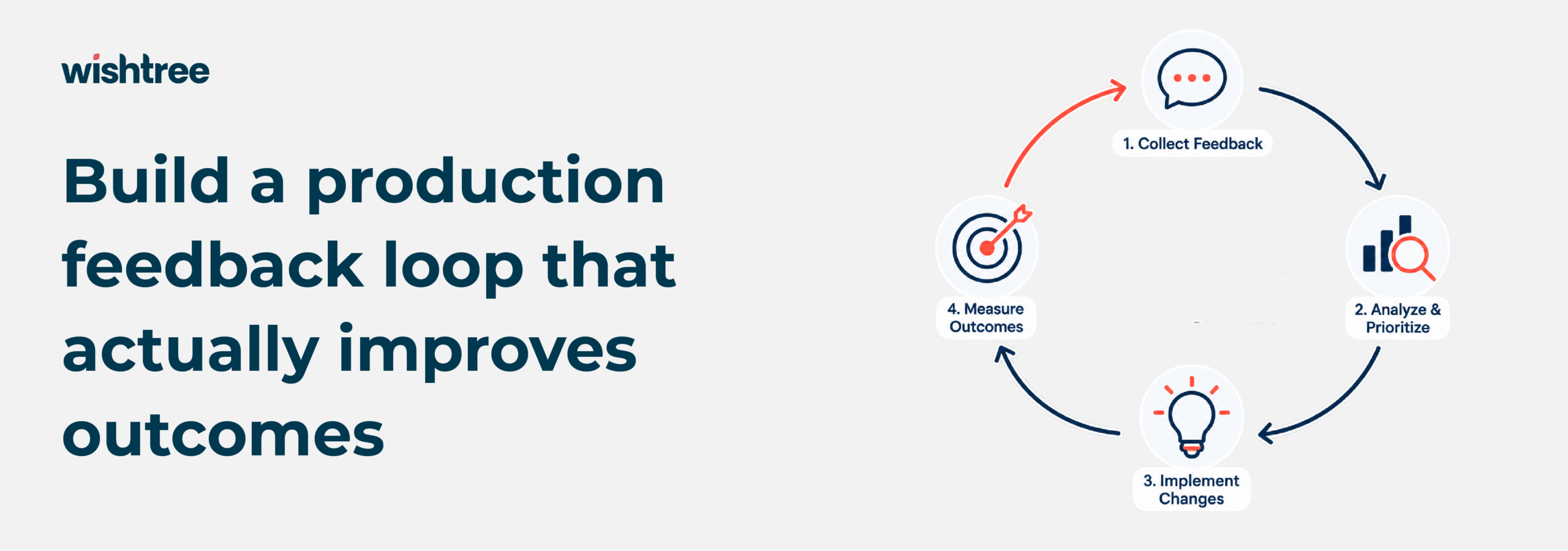
A Claude application can be technically up and running while quietly failing its users, agents rewriting every draft, employees ignoring suggested answers, nobody noticing until adoption stalls. The fix is a real feedback loop: define what “good” looks like for this specific workflow before measuring anything, build evaluations from messy real cases instead of a curated demo set, and monitor quality, reliability, cost, and business impact as four separate signals, not one dashboard. Every change to a prompt, retrieval layer, or data source should go through the same discipline as any other production release, tested, evaluated, reversible. The teams that get this right treat the whole thing as an ongoing operating capability, with a monthly review and a named owner, not a one-time launch to check off.
Executive summary
Once a Claude-powered application reaches production, enterprises need a reliable way to determine whether it is delivering accurate, useful, secure, and cost-effective results – and what to do when performance starts to drift. In this blog, you will learn how to build that production feedback loop.
Introduction
Many enterprise AI projects have a clear beginning and a very visible launch.
But after they go live, measurement often becomes less disciplined.
The team watches whether the application is available. It checks API errors and infrastructure alerts. It may track the number of requests. But those metrics do not answer the questions business leaders actually care about:
- – Are the answers useful enough for the task?
- – Are employees accepting, editing, or ignoring the outputs?
- – Is the application saving time or creating more review work?
- – Does performance change when the underlying data changes?
- – Are responses becoming slower or more expensive?
- – Can the team identify and correct a recurring failure pattern?
A Claude application can be operationally available and still be failing its users.
For example, a support-assistance workflow may return a response for every ticket. From an infrastructure perspective, it is working. But if agents regularly rewrite the drafts, ignore the suggested knowledge articles, or spend more time checking the output than writing a response themselves, the application is not creating the intended value.
1. Define “good” before measuring it
Evaluation becomes difficult when the team has not agreed on what a successful output looks like.
Consider an internal claims-support workflow. The application may be expected to:
- – Identify the relevant policy documents
- – Summarize the customer’s issue accurately
- – Separate known facts from assumptions
- – Highlight missing information
- – Draft a response using approved language
- – Escalate cases that meet defined risk conditions
Each of these expectations can become an evaluation criterion.
A practical scorecard might include:
| Dimension | Example question |
| Accuracy | Did the response reflect the source case correctly? |
| Relevance | Did it address the user’s actual request? |
| Completeness | Were important facts or required steps omitted? |
| Grounding | Can the important claims be traced to approved sources? |
| Safety | Did the application avoid an action or recommendation outside its scope? |
| Consistency | Does it produce acceptable results across similar cases? |
| Usability | Can the employee act on the output without unnecessary rework? |
| Efficiency | Is the result delivered within the required latency and cost range? |
Not every workflow needs the same scorecard. A document-drafting application may prioritize completeness and style consistency. A developer assistant may prioritize code correctness and test coverage. A regulated workflow may place greater weight on traceability, escalation, and human approval.
The important thing is to decide these priorities before the team begins optimising prompts or changing models.
2. Build evaluations around real work
A small collection of carefully selected examples can make a prototype look better than it will perform in production.
Real enterprise workloads are messier. Users phrase requests differently. Documents contain exceptions. Source systems have incomplete records. The same question may require different answers depending on the customer, jurisdiction, product, or approval level.
A useful evaluation set should therefore include:
- – Typical requests
- – Frequently occurring business cases
- – Ambiguous inputs
- – Incomplete or conflicting information
- – Out-of-scope requests
- – Sensitive or restricted scenarios
- – Long and difficult source documents
- – Cases where the correct response is to ask for clarification
- – Cases where the application should refuse or escalate
The evaluation set should also be maintained over time. New failure cases from production should not remain isolated examples in a support ticket. Once reviewed and anonymised where necessary, they should become part of the test set.
This creates a practical development rhythm:
- Capture a representative production failure
- Determine why the failure occurred
- Add the case to the evaluation set
- Apply a fix to the prompt, retrieval layer, data, tool, or workflow
- Run the full evaluation suite
- Confirm that the fix did not create new regressions
- Release the change gradually
Anthropic’s evaluation guidance makes the same broader point: teams need measurable criteria and tests that reflect the actual tasks their AI application must perform.
3. Evaluate the complete application
A model can produce a strong answer and the application can still fail.
That happens because enterprise AI applications are usually more than a model call. They may include:
- – Data retrieval
- – Access control
- – Prompt construction
- – Tool selection
- – Business rules
- – Human approval
- – Output formatting
- – Integration with a system of record
If the retrieval layer returns the wrong documents, a well-written answer may still be wrong. If the application passes incomplete context to Claude, the issue may not be the model. If a tool call writes to the wrong system, the problem is more serious than a poor response.
Evaluation should therefore cover the entire path from user request to business outcome.
For a Claude-assisted knowledge application, that might include:
- – Whether the user was allowed to access the source material
- – Whether the correct documents were retrieved
- – Whether the answer was grounded in those documents
- – Whether citations or source references were displayed correctly
- – Whether the response stayed within the user’s role and data permissions
- – Whether the user found the answer useful
- – Whether the application reduced time spent searching
This is also where Wishtree’s AWS and Databricks engineering experience becomes relevant. The application needs a reliable relationship between governed data, retrieval, model interaction, monitoring, and business workflow.
4. Monitor what changes after launch
Pre-production evaluations tell you whether the application performed acceptably against a known test set. Production monitoring tells you what is happening with real usage.
The monitoring layer should cover four related areas.
Quality
Track the quality signals that matter for the task:
- – User ratings or feedback
- – Human review scores
- – Correction or rewrite rates
- – Retrieval relevance
- – Citation or grounding failures
- – Escalation rates
- – Repeated questions after an answer
A low thumbs-up rate is a useful signal, but it is not a diagnosis. The team still needs to inspect examples and identify patterns.
Reliability
Monitor the technical behaviour of the application:
- – Request failures
- – Timeouts
- – Tool errors
- – Incomplete responses
- – Retrieval failures
- – Unusual latency
- – Dependency failures
A slow response may come from the model, but it may also come from an inefficient query, a downstream service, or an oversized context window.
Cost and efficiency
Track the cost of the complete workflow rather than looking only at the model call:
- – Token consumption
- – Average cost per task
- – Cost by team, application, or use case
- – Retry rates
- – Context size
- – Tool and retrieval overhead
- – Cost changes after prompt or workflow updates
This matters because adoption can expose an economic problem that was invisible during a pilot. A workflow used by ten people may be affordable. The same design used across thousands of employees may require different retrieval, caching, routing, or prompt strategies.
Business impact
The most important metrics usually sit outside the AI application:
- – Time taken to complete the task
- – First-response time
- – Case resolution time
- – Review effort
- – Error or rework rate
- – Employee adoption
- – Customer satisfaction
- – Revenue, loss, or operational impact where relevant
Generative AI usage is not the same as business value. A high number of requests may indicate strong adoption, or it may indicate that users are repeatedly asking the system to correct itself.
5. Create a feedback loop people will use
A production feedback loop fails if feedback is too difficult to provide or too vague to act on.
A single “Was this helpful?” button is easy to add, but it rarely gives engineering teams enough information. Where appropriate, feedback should capture the type of problem:
- – Incorrect answer
- – Missing information
- – Poorly retrieved source
- – Outdated content
- – Unsafe or out-of-scope response
- – Unclear explanation
- – Slow response
- – Unhelpful recommendation
Users should also be able to provide a corrected answer or select the source they expected the application to use. That gives the team more actionable evidence than a score alone.
Subject-matter experts play an important role as well. They can review a sample of outputs against business-specific criteria, especially where automated grading is not reliable. Anthropic’s work on agent evaluations describes evaluations as a way to test outputs using defined grading logic, which can include automated and task-specific approaches.
The review process should have ownership.
Someone should be responsible for deciding:
- – Which issues require an immediate fix
- – Which issues indicate a data-quality problem
- – Which issues belong in a new business rule
- – Which issues require a change to the prompt or retrieval strategy
- – Which issues should be accepted as a known limitation
Without ownership, feedback becomes a backlog of interesting examples rather than an improvement system.
6. Use AWS and Databricks as part of the operating model
A production Claude application should not exist as an isolated AI component. It should fit into the organization’s existing data, security, application, and operations environment.
On AWS, observability can be connected to application behaviour, model interactions, tool calls, guardrails, and operational issues. Amazon CloudWatch’s generative AI observability capabilities are designed to help teams assess and investigate AI application behaviour in context.docs.aws.amazon+1
On Databricks, teams can connect governed enterprise data with evaluation, tracing, monitoring, and application lifecycle practices. Databricks describes its AI capabilities as supporting the building, evaluating, deploying, and monitoring of AI applications.
The exact architecture will vary, but a practical enterprise design may include:
- – Governed data products for retrieval and context
- – A traceable application layer for prompts, responses, tools, and decisions
- – Evaluation datasets and experiment history
- – Human feedback linked to specific application versions
- – Dashboards for technical and business metrics
- – Access controls that follow the user and the data
- – Release processes for prompts, retrieval logic, and model configuration
The point is not to add more dashboards for their own sake. It is to connect the evidence needed to understand whether the application is working.
7. Treat changes like production changes
Prompts, retrieval logic, data sources, model configurations, and tools can all change application behaviour.
They should be managed with the same discipline applied to other production components.
Before releasing a change, the team should ask:
- – What problem is this change intended to solve?
- – Which evaluation cases should improve?
- – Which risks could increase?
- – Has the full evaluation suite been run?
- – Has the cost or latency impact been checked?
- – Can the change be rolled back?
- – Will the release be staged or immediately available to everyone?
A useful release record should include:
- – Version of the prompt or workflow
- – Model configuration
- – Data and retrieval changes
- – Evaluation results
- – Human review findings
- – Release date and owner
- – Rollback plan
This becomes especially important when an application has several dependent components. A change to a document index may affect retrieval quality. A change to the prompt may affect tool use. A change to access controls may alter the available context.
The more widely the application is used, the less acceptable it becomes to rely on informal knowledge about what changed.
8. Review the application as a business capability
A Claude application should have a regular review cadence that brings engineering, product, data, security, and business owners together.
A monthly review could cover:
- – What users are doing with the application
- – Where quality has improved or declined
- – Which failure modes are increasing
- – Whether the application is meeting its business target
- – Whether costs remain within the expected range
- – Which data sources or workflows need attention
- – Whether the application should expand, be redesigned, or be retired
This review should not become a presentation of isolated success stories. It should include difficult cases and unresolved limitations.
Sometimes the right decision is to expand the application. Sometimes it is to narrow its scope. Sometimes a workflow that looked promising during a pilot should be turned off because the measurable benefit does not justify the operational burden.
That is not failure. It is responsible portfolio management at the application level.
What you can do next
If your Claude application is already live – or approaching go-live, start with a short production health check:
- Write down the three outcomes the application is expected to improve.
- Select a representative set of real, anonymised tasks.
- Define what a good, weak, unsafe, and incomplete response looks like.
- Review quality, latency, cost, adoption, and business impact together.
- Add a clear feedback path for employees and subject-matter experts.
- Establish an owner and review cadence for production improvements.
Wishtree Technologies, a part of the Claude Partner Network, helps enterprises build and operate Claude-powered applications across their cloud, data, and business environments.
With engineering foundations across AWS and Databricks, we help connect governed data, application workflows, evaluation, observability, and continuous improvement, so production AI becomes an operating capability rather than a one-time launch.
Contact us today to get started.
Frequently Asked Questions (FAQs)
Is evaluation only needed before a Claude application goes live?
No. Pre-production evaluation establishes a baseline, but production data reveals new usage patterns, edge cases, and failure modes. The evaluation set should grow as the application encounters real situations.
Should every response be reviewed by a human?
Not necessarily. The level of review should reflect the workflow’s risk, complexity, and potential impact. Low-risk applications may rely on sampling and user feedback, while higher-risk workflows may require approval before an output can trigger an action.
How do we know whether a quality problem comes from Claude or from our data?
Trace the complete application path. Check the user request, retrieved context, access permissions, prompt construction, tool calls, model output, and final business action. Many apparent model failures are actually retrieval, data-quality, or workflow-design failures.
How can enterprises avoid monitoring without improving?
Assign ownership to each important metric and connect monitoring to a release process. A dashboard is useful only when a team can investigate a signal, decide on a change, test that change, and verify the result.