Table of Contents
TL;DR
The Databricks Lakehouse on AWS is the premier architecture for unifying data engineering, BI, and AI in 2026. By building on top of Amazon S3 with Delta Lake and Unity Catalog, enterprises eliminate data silos and move faster from raw ingestion to production-grade Machine Learning. Wishtree Technologies provides a 5-step blueprint to deploy this stack, ensuring high-performance analytics with a focus on FinOps and centralized governance.
Executive Summary
Modern enterprises struggle with “tool sprawl” across S3, Redshift, and SageMaker. The Databricks on AWS stack solves this by creating a Unified Lakehouse, a single platform that combines the performance of a data warehouse with the flexibility of a data lake.
The core of this architecture relies on open formats (Delta Lake) and centralized governance (Unity Catalog), allowing teams to manage permissions and data lineage across the entire AWS ecosystem. Wishtree Technologies guides organizations through a disciplined 5-step deployment process:
Foundation: Establishing a Delta Lake on S3 for ACID transactions.
Compute: Optimizing EC2 and DBU (Databricks Unit) tiers for cost efficiency.
Governance: Implementing Unity Catalog for “single pane of glass” security.
AI Integration: Leveraging MLflow and Spark for end-to-end model lifecycles.
FinOps: Monitoring spend and performance to prevent “cluster sprawl.”
By choosing Databricks on AWS, companies gain a distinctive edge in AI readiness compared to traditional siloed stacks, benefiting from a “data operating system” that scales with their AI ambitions.
Final Key Takeaways
The Power of Openness: Using Delta Lake on S3 ensures your data is stored in open formats, preventing vendor lock-in while providing warehouse-level reliability.
Governance is the “North Star”: Unity Catalog is non-negotiable for enterprise scale; it centralizes metadata and access control across workspaces and external sources like Redshift.
Cost Control requires FinOps: Without standardized cluster policies and automated scaling, cloud costs can spiral out of control. Successful teams treat “DBU optimization” as a core competency.
AI-First Architecture: Databricks isn’t just for ETL; with built-in MLflow and GenAI support, it significantly shortens the path from data engineering to RAG-based AI applications.
Seamless Integration: You don’t have to “rip and replace.” Databricks integrates natively with AWS Glue, IAM, and SageMaker, allowing for a hybrid approach that respects existing investments.
Introduction
If you are running analytics on AWS but juggling S3 buckets, Redshift instances, and scattered SageMaker experiments, the Databricks Lakehouse on AWS is one of the most effective ways to bring everything under one coherent, AI‑ready architecture. It unifies batch, streaming, BI, and machine learning on top of your existing data lakes, and does not force you into another silo.
Wishtree Technologies has helped enterprises in retail, fintech, and healthcare move from ad‑hoc pipelines to Databricks on AWS through disciplined cloud migration and modern data platform architecture. As a specialist in digital product engineering, we have simplified governance and unlocked more advanced AI use cases on the same stack. The results typically include faster ETL, better governance via Unity Catalog, and a shorter path from raw data to production‑grade ML.
Why enterprises are betting on Databricks on AWS
A robust Databricks on AWS architecture combines the openness of a lakehouse with managed compute and unified governance. This, then, definitely makes it attractive for organizations already standardized on Databricks AWS services.
Key reasons it has become a preferred analytics and AI platform:
Databricks runs a data lakehouse on open formats like Delta Lake. It gives you warehouse‑style reliability and performance on top of low‑cost object storage such as Amazon S3.
Unity Catalog centralizes metadata, permissions, and lineage across workspaces, catalogs, schemas, and objects, so you can manage S3‑backed Delta tables and external sources from a single governance layer.
Built‑in support for Apache Spark, MLflow, and modern ML/GenAI workloads means data science, ML, and analytics teams can work from the same platform.
Databricks on AWS can integrate with services like AWS Glue, Lake Formation, and Redshift through lakehouse federation, giving a unified query surface without duplicating all data.
These capabilities help organizations consolidate tools, reduce silos, and create a single system of insight that can drive both reporting and AI.
How Wishtree deploys Databricks on AWS: 5‑step blueprint
Successful AWS Databricks deployments focus on getting the lakehouse foundation, governance, and cost model right before scaling AI workloads.
1. Land your lakehouse on S3 and Delta
Use Amazon S3 as the central data lake for raw, curated, and consumption‑ready zones, organizing data with naming conventions that reflect domains and environments.
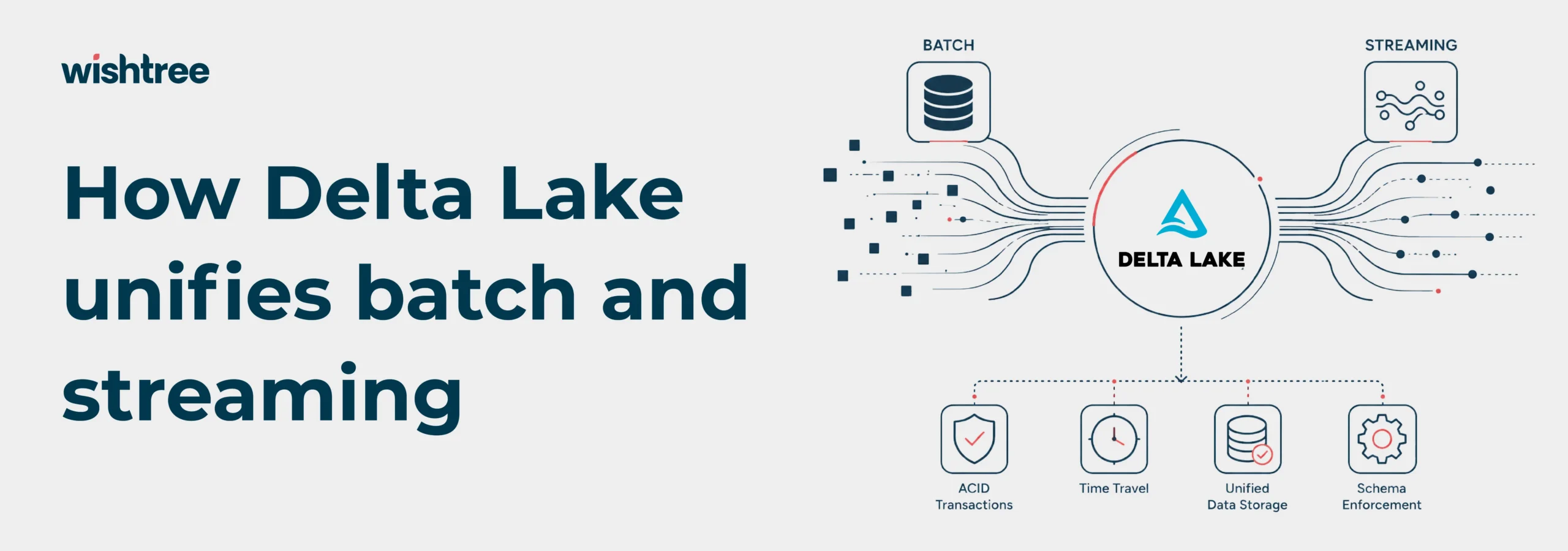
Convert key tables to Delta Lake to get ACID transactions, schema enforcement, time travel, and efficient updates on top of S3.
Use AWS Glue crawlers and Databricks Unity Catalog to register tables and manage access consistently.
This gives you open, reliable storage that Databricks, AWS analytics, and BI tools can all use.
2. Deploy Databricks workspaces with the right compute model
Provision Databricks workspaces in your AWS account, choosing between classic clusters and newer serverless or autoscaling options depending on workload patterns.
By leveraging deep cloud engineering expertise, you can optimize cost by selecting appropriate Databricks Unit (DBU) tiers and EC2 families, as DBU rates and instance pricing vary by compute type.
Integrate with AWS IAM roles and your identity provider so that access to S3, Glue, Redshift, and other services is governed centrally.
A careful mapping of workload types (ETL, interactive analytics, ML training) to cluster types and DBU tiers is one of the biggest levers for cost control.
3. Unify governance with Unity Catalog and lakehouse federation
Use Unity Catalog to centralize metadata, fine‑grained access policies, and lineage across all Databricks workspaces and catalogs.
Integrate external SQL databases such as Redshift, MySQL, or Postgres via Lakehouse Federation, allowing analysts to query them through Databricks without copying data into S3 first.
Apply role‑based access control and data‑classification‑driven policies across table, view, and column levels in Unity Catalog.
This governance layer is critical as the number of data sources, teams, and AI workloads grows.
4. Build AI and ML pipelines with Databricks and AWS
Use Databricks notebooks, MLflow tracking, and feature tables to run experiments, track models, and manage AI and machine learning assets.
Depending on your architecture, you can serve models directly from Databricks, or export and deploy them via AWS services like SageMaker or serverless inference endpoints.
With the rise of lakehouse‑based GenAI, organizations increasingly connect Databricks‑managed data sets to downstream RAG and copilot workloads.
For a deep dive into building enterprise RAG pipelines on AWS, explore our guide to Bedrock‑based copilots with private data.
This creates an end‑to‑end flow from ingestion, through feature engineering, to operational ML and GenAI applications.
This pipeline approach aligns with enterprise data product development – treating curated datasets, feature stores, and trained models as reusable assets rather than one‑off outputs.
5. FinOps and monitoring: keep performance and cost in check
Combine Databricks’ cost reports and DBU usage metrics with AWS cost‑management tools and tagging to understand which teams and workloads drive spend.
Use Databricks performance features (auto‑optimize, auto‑compact, Photon, and partitioning strategies) plus table‑level design (for example, clustering) to improve query performance and control costs.
Monitor job reliability, latency, error rates, and resource utilization to proactively catch bottlenecks and failures.
Looking ahead, autonomous infrastructure capabilities will enable predictive scaling and self‑healing recovery for Databricks workloads, reducing manual intervention and improving both reliability and cost efficiency.
A disciplined FinOps layer helps ensure that the benefits of the lakehouse are not offset by uncontrolled compute usage.
Databricks on AWS vs. other analytics stacks
Databricks on AWS is not the only way to run analytics on AWS, but it offers a distinctive balance of openness, governance, and AI readiness.
Stack | Integration on AWS | Cost model (high level) | AI and ML maturity | Governance approach |
Databricks on AWS | Deep integration with S3, Glue, Lake Formation | DBU‑based + AWS infra costs give discounts for commitments | Strong: Spark, MLflow, lakehouse AI support | Unity Catalog for centralized, fine‑grained control |
Snowflake on AWS | Connects to S3, Redshift, and external tables | Credit‑based, storage + compute separated | Growing ML/AI features | Role‑based access and secure views inside Snowflake |
Amazon Redshift stack | Native AWS analytics,integrates with S3 and Lakehouse | Node/RA3‑based, can be efficient for warehouse workloads | Limited native ML vs. dedicated ML platforms | IAM‑heavy with Lake Formation and resource policies |
For many AWS‑centric organizations, Databricks becomes the data and AI operating system across warehouses, lakes, and downstream ML/GenAI workloads.
As data platforms become mission‑critical, data platform resilience ensures that analytics and AI services remain available during infrastructure events, protecting both operational continuity and customer trust.
Common Databricks on AWS pitfalls (and how to avoid them)
Most issues stem from governance, cost management, or table design rather than from the Databricks platform itself.
Pitfall | What goes wrong | How to fix it |
Cluster sprawl and high costs | Too many under‑utilized clusters and ad‑hoc jobs drive up DBU and EC2 spend. | Standardize cluster policies, use autoscaling/serverless where appropriate, and enforce tags and budgets. |
Poor S3 and table design | Small files, inconsistent partitioning, and mixed formats hurt query performance. | Adopt Delta Lake, proper partitioning, compaction, and auto‑optimize/auto‑compact features. |
Weak governance and visibility | Data access is inconsistent, and lineage is unclear across teams. | Make Unity Catalog the single governance layer and require all tables and permissions to go through it. |
Tool and catalog fragmentation | Multiple catalogs and tools make it hard to get a single view of data. | Use Unity Catalog plus Glue/Lake Formation integrations and establish a clear “system of record” pattern. |
Why partner with Wishtree for Databricks on AWS?
Modern analytics and AI work is as much about architecture and governance as it is about Spark code. As a leader in digital product engineering and cloud engineering, Wishtree helps you:
Working with a specialist helps you:
Choose the right mix of Databricks, native AWS services, and BI tools for your specific analytics and AI roadmap.
Use proven blueprints for S3 + Delta layouts, Unity Catalog rollout, and lakehouse federation, instead of experimenting from scratch.
Design clusters, DBU usage, and governance to avoid surprises in both spend and security.
If you are evaluating Databricks on AWS or want to tighten an existing deployment, a short architecture and cost review often surfaces quick wins.
Launch Your Databricks on AWS Lakehouse with Wishtree
Wishtree Technologies helps teams design and implement this stack end‑to‑end – from S3 + Delta layouts and Unity Catalog rollout to AI and ML pipelines and cost optimization, so you can focus on using insights rather than stitching platforms together.
Ready to explore what Databricks on AWS could do for your data and AI roadmap?
Contact us today and get a concrete view of architecture options, quick wins, and potential savings!
FAQs
How is Databricks on AWS different from running everything on native AWS services?
Databricks provides a unified lakehouse platform with Delta Lake, Spark, MLflow, and Unity Catalog on top of S3, whereas a pure‑AWS stack typically combines multiple services (for example, S3, Glue, EMR, Redshift, Athena, SageMaker) that teams must integrate and govern separately. Many enterprises adopt Databricks to reduce tool sprawl and standardize data and ML workflows.
What does Databricks on AWS typically cost?
Costs depend on DBU tier, EC2 instance choices, workload patterns, and reserved/committed usage, so there is no single “per TB” number. In practice, organizations control spend by mapping workloads to appropriate cluster types, turning on auto‑optimize features, and using tagging and FinOps processes to track which teams drive consumption.
Is Databricks on AWS suitable for regulated industries (for example, finance, healthcare)?
Yes, Databricks on AWS supports security features such as VPC deployment, encryption, fine‑grained access control, and detailed audit logs, and it can be used in regulated environments when configured correctly. Compliance depends on the overall architecture and processes (identity, data classification, monitoring), not the platform alone.
How long does a typical Databricks migration or greenfield implementation take?
Timelines vary by scope and data complexity, but many organizations move from pilot to production in a few months when they focus on a narrow set of high‑value use cases and well‑defined data domains. Larger multi‑domain programs can take longer but benefit from delivering value incrementally.
Can we integrate Databricks on AWS with existing BI tools and ML platforms?
Yes. Databricks can expose tables and views to BI tools such as Power BI, Tableau, and QuickSight, and can interoperate with AWS services like Redshift and SageMaker via connectors and federation. This lets teams adopt Databricks without discarding existing investments.