
TL;DR
New AWS AI tools only amplify problems if your data foundation is fragmented. Check these four things before you expand.
- – Permissions: enforce access at the data layer, not in app code or scattered IAM policies.
- – Zero-copy data: search directly over Delta Lake on S3 instead of duplicating data into vector stores.
- – Auditability: trace every piece of data an AI model touched, not just API latency.
- – Compute routing: send simple prompts to small models and save frontier models for complex reasoning.
Introduction
Your dev team spent weeks on an Amazon Bedrock prototype. Tests look great. Then you hook it up to live S3 buckets, and security and compliance halt it on the spot.
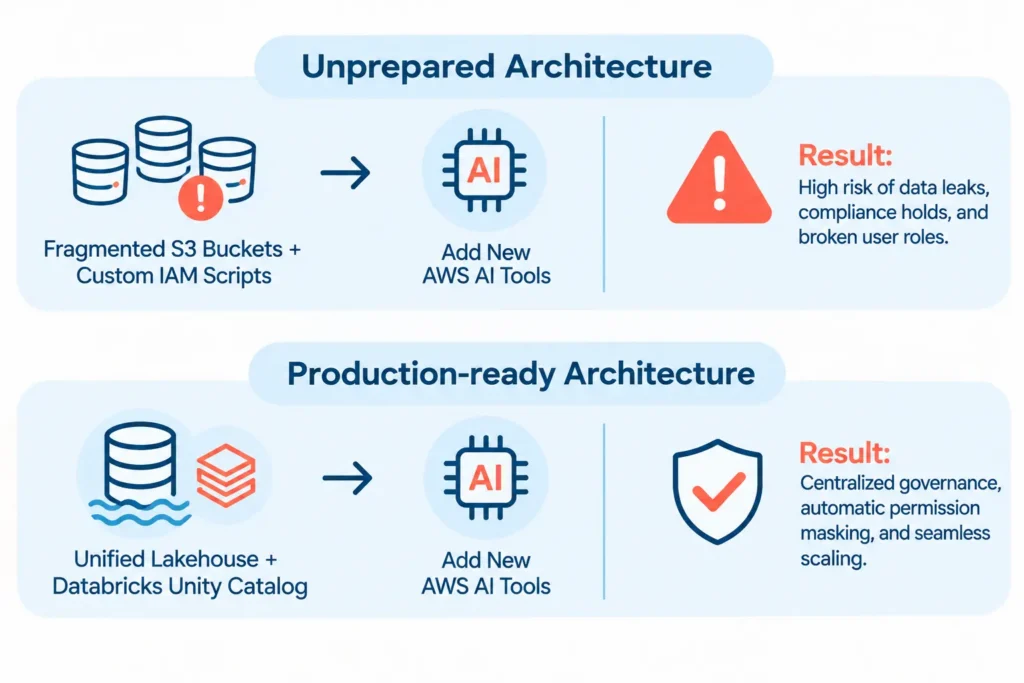
Fair concern. Plug advanced cloud AI tools into disorganized, legacy storage, and you get permission leaks, unmonitored prompt injection, and compliance violations.
Every year, AWS re:Invent brings an exciting wave of new service announcements, model integrations, and compute options. But adding shiny new cloud tools onto a fragmented, ungoverned data foundation only amplifies your technical debt, the same reason so many teams stop funding AI pilots that never reach production.
As autonomous agents take over real-world operations, you need an AI-ready data architecture that is secure and reliable before you expand your cloud footprint.
The 4-point AWS architecture readiness checklist
Before signing off on new cloud budgets or adding generative AI endpoints, enterprise engineering leads must evaluate whether their AWS data architecture is AI-ready, using four foundational criteria:
1. Centralized permission lineage
If an employee asks an AI assistant for sales context, does it respect their database authorization? Manage user permissions in custom front-end code or individual AWS IAM policies, and policy drift is guaranteed. Security rules belong at the root data layer.
2. Zero-copy vector data access
Duplicating customer databases or internal docs across multiple vector stores creates sync delays and inflates storage costs. Production-ready setups index searches directly over open storage formats – Delta Lake on S3, without moving raw files, which is also one of the fastest wins for AWS AI cost optimization.
3. Continuous auditability
Can compliance trace every piece of data an AI model accessed to produce a specific output? If your logs only capture API latency, and not data lineage, enterprise audits will always be a struggle.
4. Tiered compute routing
Sending routine admin prompts to multi-billion-parameter foundation models wastes your compute budget and drives up cloud costs.
A production-ready setup routes intelligently: simple queries go to smaller, fine-tuned models, while top-tier models are reserved for complex, multi-step reasoning.

Establishing centralized governance with Databricks Unity Catalog
To pass rigorous security reviews without slowing down developer velocity, leading cloud teams are pairing Databricks with their AWS cloud foundation.
Instead of trying to enforce separate security guardrails for every new AWS tool you deploy, Databricks Unity Catalog provides a single control plane across all your Amazon S3 data assets:
- Security policies defined in Unity Catalog apply automatically whether data is queried through SQL, analyzed by a data scientist, or accessed by a generative AI model.
- Sensitive customer identifiers and financial metrics are masked dynamically based on the requesting user’s role.
- Every interaction, from raw data ingest to the final model output, is recorded in a single, centralized audit log.
Security teams can apply the same governance layer to their SOC pipelines, as covered in our guide to AI threat detection on AWS.
When you establish this governance baseline, you have an AI-ready data architecture, and your engineering team can safely adopt new AWS capabilities as soon as they are announced.
How Wishtree Helps
At Wishtree, we work with CTOs, VPs of Engineering, and product leaders to clean up fragmented data stacks, build robust data governance pipelines, and ship production-grade software on AWS and Databricks.
Want to see how your current AWS data setup holds up under heavy concurrent workloads before making new software commitments? Start a risk-free trial with our engineering team today.
Frequently Asked Questions (FAQs)
Why do compliance and security teams frequently delay AWS AI deployments?
Compliance teams step in when user access permissions are not enforced at the data layer. If an AI tool can bypass traditional database controls and pull sensitive information from unstructured S3 buckets, it creates immediate regulatory and data-privacy risks.
How does Databricks Unity Catalog simplify security on AWS?
Unity Catalog acts as a centralized governance layer over your Amazon S3 storage. Instead of writing custom bucket policies or application-level rules for every tool, Unity Catalog enforces access controls, data masking, and audit logging uniformly across all workloads.
Do we need to migrate our data out of AWS S3 to use Databricks?
No. Databricks operates on open formats directly within your existing Amazon S3 environment. Your data stays securely inside your AWS account boundary, eliminating vendor lock-in and avoiding migration fees.
How quickly can Wishtree help us audit our AWS data architecture?
We can jump in immediately. Our cloud engineering leads can perform a full architectural assessment, identify security and cost bottlenecks, and help your team establish a production-ready data pipeline. Contact our team today to get started.